Before you begin please contact support@wiv.ai to allow your domain sender
If you like to send email from Wiv platform with your own domain we will provide you with the following records to add/update in your DNS server
first you need to provide us with your custom email sender [e.g wiv@domain.com]
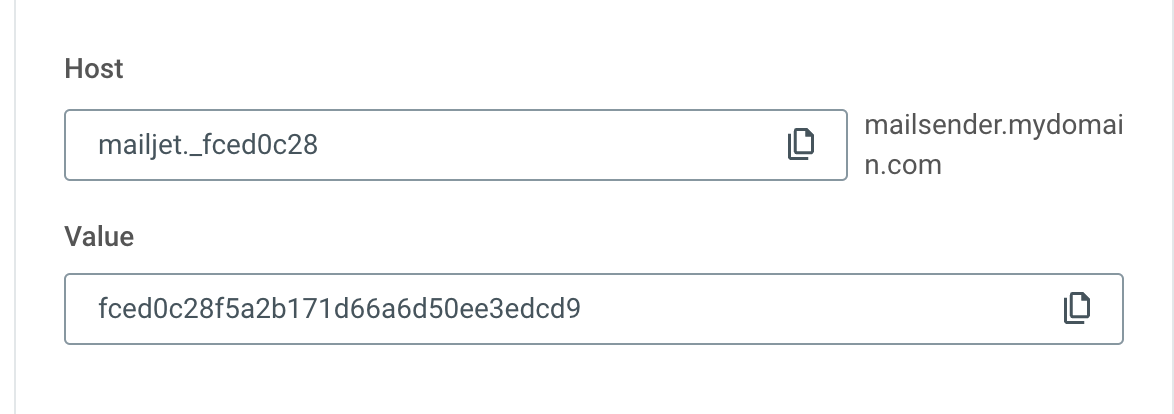
the custom email can be under your main domain or dedicated sub domain. we will add this domain/sub domain to our mailing system and provide you with those 3 TXT records
create TXT record
update you SPF record to include “include:spf.mailjet.com”
add DKIM TXT record
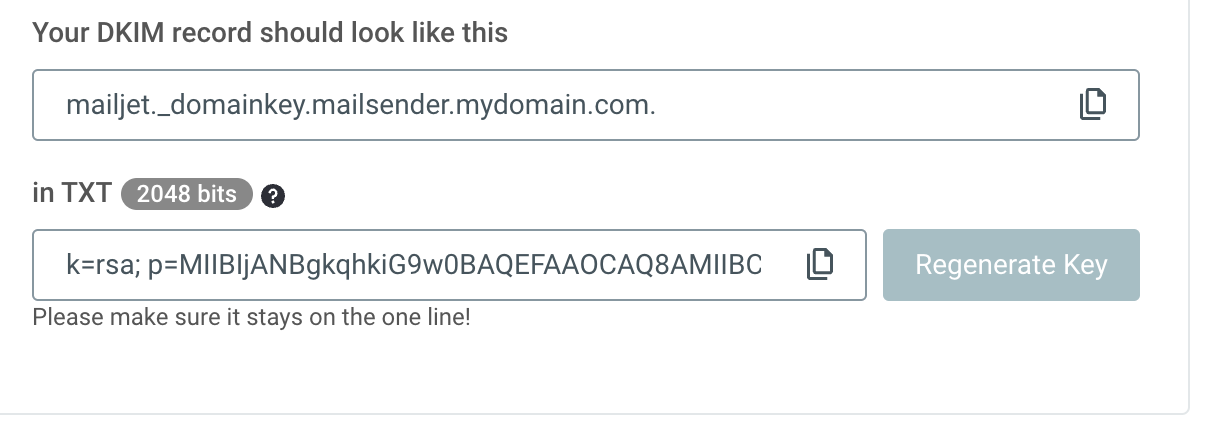
after successful validation of your domain records, all Wiv emails will be routed from your email sender.
Was this article helpful?
That’s Great!
Thank you for your feedback
Sorry! We couldn't be helpful
Thank you for your feedback
Feedback sent
We appreciate your effort and will try to fix the article