
This guide provides the necessary steps to set up a Snowflake OAuth integration, enabling the connection of your Snowflake account to the Wiv platform.
Quick Start Prerequisites
- Account Identifier (e.g.,
gbc79660.us-east-1) - Client ID (from your OAuth security integration)
- Client Secret (from your OAuth security integration)
- Service User credentials (WIV_SERVICE_USER)
Follow the steps below to retrieve these values and configure the integration.
Prerequisites
- A Snowflake account with ACCOUNTADMIN role (or a role with CREATE INTEGRATION privilege)
- Access to Snowflake SQL interface (Snowsight or SnowSQL)
Step 1: Create Service User and Role
Create a dedicated service user and role for the Wiv integration. This isolates Wiv access from your personal accounts and provides a clean audit trail.
1.1 Create the Role
-- Create a dedicated role for Wiv
CREATE ROLE IF NOT EXISTS WIV_OAUTH_ROLE;
1.2 Create the Service User
-- Create the service user
CREATE USER IF NOT EXISTS WIV_SERVICE_USER
    PASSWORD = 'YourSecurePassword123!'
    LOGIN_NAME = 'WIV_SERVICE_USER'
    DISPLAY_NAME = 'Wiv Service Account'
    DEFAULT_ROLE = WIV_OAUTH_ROLE
    DEFAULT_WAREHOUSE = COMPUTE_WH
    MUST_CHANGE_PASSWORD = FALSE
    COMMENT = 'Service account for Wiv OAuth integration';


-- Grant the role to the user
GRANT ROLE WIV_OAUTH_ROLE TO USER WIV_SERVICE_USER;
Important: Store the password securely. You will need it when authorizing the OAuth connection.
1.3 Grant Warehouse Access
-- Grant warehouse usage (required to run queries)
GRANT USAGE ON WAREHOUSE COMPUTE_WH TO ROLE WIV_OAUTH_ROLE;
Step 2: Configure Access Permissions
Grant the WIV_OAUTH_ROLE access to the specific databases, schemas, and objects needed.
Option A: Access to Specific Tables
-- Grant usage on database and schema
GRANT USAGE ON DATABASE your_database TO ROLE WIV_OAUTH_ROLE;
GRANT USAGE ON SCHEMA your_database.your_schema TO ROLE WIV_OAUTH_ROLE;


-- Grant SELECT on specific tables
GRANT SELECT ON TABLE your_database.your_schema.cost_data TO ROLE WIV_OAUTH_ROLE;
GRANT SELECT ON TABLE your_database.your_schema.usage_metrics TO ROLE WIV_OAUTH_ROLE;
Option B: Access to Specific Views
-- Grant usage on database and schema
GRANT USAGE ON DATABASE analytics_db TO ROLE WIV_OAUTH_ROLE;
GRANT USAGE ON SCHEMA analytics_db.reporting TO ROLE WIV_OAUTH_ROLE;


-- Grant SELECT on specific views
GRANT SELECT ON VIEW analytics_db.reporting.cost_summary_view TO ROLE WIV_OAUTH_ROLE;
Option C: Access to All Objects in a Schema
-- Grant usage on database and schema
GRANT USAGE ON DATABASE your_database TO ROLE WIV_OAUTH_ROLE;
GRANT USAGE ON SCHEMA your_database.your_schema TO ROLE WIV_OAUTH_ROLE;


-- Grant SELECT on all existing tables and views
GRANT SELECT ON ALL TABLES IN SCHEMA your_database.your_schema TO ROLE WIV_OAUTH_ROLE;
GRANT SELECT ON ALL VIEWS IN SCHEMA your_database.your_schema TO ROLE WIV_OAUTH_ROLE;


-- Grant SELECT on future tables and views (auto-grant for new objects)
GRANT SELECT ON FUTURE TABLES IN SCHEMA your_database.your_schema TO ROLE WIV_OAUTH_ROLE;
GRANT SELECT ON FUTURE VIEWS IN SCHEMA your_database.your_schema TO ROLE WIV_OAUTH_ROLE;
-- Verify all grants to the role
SHOW GRANTS TO ROLE WIV_OAUTH_ROLE;
Expected output should include:
USAGE ON WAREHOUSEUSAGE ON DATABASEUSAGE ON SCHEMASELECT ON TABLE/VIEW(for each object)
Step 3: Create OAuth Security Integration
CREATE SECURITY INTEGRATION WIV_OAUTH_INTEGRATION
    TYPE = OAUTH
    ENABLED = TRUE
    OAUTH_CLIENT = CUSTOM
    OAUTH_CLIENT_TYPE = 'CONFIDENTIAL'
    OAUTH_REDIRECT_URI = 'https://api.wiv.ai/integrations/snowflake'
    OAUTH_ISSUE_REFRESH_TOKENS = TRUE
    OAUTH_REFRESH_TOKEN_VALIDITY = 7776000
    BLOCKED_ROLES_LIST = ('ACCOUNTADMIN', 'ORGADMIN', 'SECURITYADMIN');
| Setting | Description |
|---|---|
OAUTH_CLIENT_TYPE = 'CONFIDENTIAL' | Server-side application requiring Client Secret |
OAUTH_REDIRECT_URI | Must match exactly: https://api.wiv.ai/integrations/snowflake |
OAUTH_REFRESH_TOKEN_VALIDITY = 7776000 | Refresh tokens expire after 90 days |
BLOCKED_ROLES_LIST | Prevents authorization with privileged admin roles |
Step 4: Retrieve OAuth Credentials
Get Client ID
DESC SECURITY INTEGRATION WIV_OAUTH_INTEGRATION;
Look for OAUTH_CLIENT_ID in the output (e.g., sS9ikaxJmL7fnBkt09fcIeHUiJw=).
Get Client Secret
SELECT SYSTEM$SHOW_OAUTH_CLIENT_SECRETS('WIV_OAUTH_INTEGRATION');
Example output:
{
  "OAUTH_CLIENT_SECRET": "i4qOOF9Obf81+iNG9KQ1SSJj6i5JwhCgvX5aM307+3I=",
  "OAUTH_CLIENT_SECRET_2": "7UW6hG/EjYhm3LyiVazh3Oq9IRfBy9vKaXGqdic9h84=",
  "OAUTH_CLIENT_ID": "sS9ikaxJmL7fnBkt09fcIeHUiJw="
}
Use OAUTH_CLIENT_SECRET (primary) for the integration.
Step 5: Get Your Account Identifier
Your account identifier is found in your Snowflake URL.
| URL | Account Identifier |
|---|---|
https://gbc79660.us-east-1.snowflakecomputing.com | gbc79660.us-east-1 |
https://myorg-account.us-west-2.aws.snowflakecomputing.com | myorg-account.us-west-2.aws |
Step 6: Configure Integration in Wiv Platform
- Navigate to Integrations in the Wiv platform
- Click Add Integration → Snowflake
- Fill in the required fields:
| Field | Value |
|---|---|
| Integration Name | Your choice (e.g., "Production Snowflake") |
| Account Identifier | From Step 5 (e.g., gbc79660.us-east-1) |
| Client ID | From Step 4 |
| Client Secret | From Step 4 |
- Click Connect or Authorize
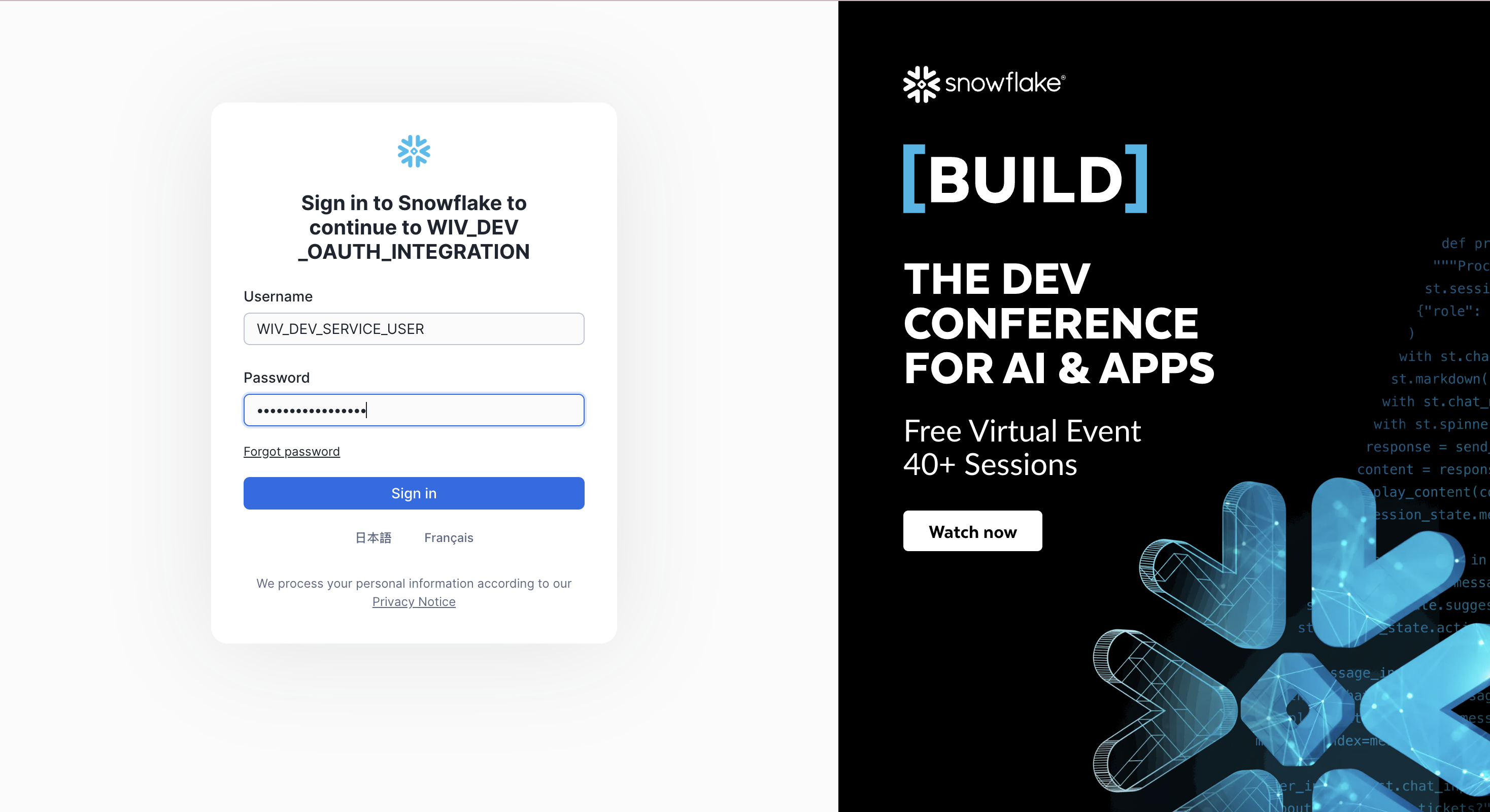
- You will be redirected to Snowflake login page
- Log in as the service user:
- Username:
WIV_SERVICE_USER - Password: (the password you set in Step 1.2)
- Username:
- Approve the authorization
- You will be redirected back to Wiv
Important: Always log in as
WIV_SERVICE_USERduring the OAuth flow, not your personal account. This ensures all Wiv queries run under the service account with the correct permissions.

Step 7: Verify the Connection
After authorization, test the connection by running a simple query in Wiv to verify access to your data.
If you encounter errors, check:
- The service user has
WIV_OAUTH_ROLEas default role - The role has all required grants (database, schema, objects, warehouse)
- The OAuth token is valid (re-authorize if expired)
Complete Setup Example
Here's a complete example for setting up Wiv access to a CUR (Cost and Usage Report) view:
-- ============================================================
-- STEP 1: Create Role and User
-- ============================================================
CREATE ROLE IF NOT EXISTS WIV_OAUTH_ROLE;


CREATE USER IF NOT EXISTS WIV_SERVICE_USER
    PASSWORD = 'WivSecure2025!'
    LOGIN_NAME = 'WIV_SERVICE_USER'
    DISPLAY_NAME = 'Wiv Service Account'
    DEFAULT_ROLE = WIV_OAUTH_ROLE
    DEFAULT_WAREHOUSE = COMPUTE_WH
    MUST_CHANGE_PASSWORD = FALSE;


GRANT ROLE WIV_OAUTH_ROLE TO USER WIV_SERVICE_USER;
ALTER USER WIV_SERVICE_USER SET PASSWORD = 'WivSecure2025!';

-- ============================================================
-- STEP 2: Grant Permissions
-- ============================================================
GRANT USAGE ON WAREHOUSE COMPUTE_WH TO ROLE WIV_OAUTH_ROLE;
GRANT USAGE ON DATABASE PRD_EDW_INFOMART TO ROLE WIV_OAUTH_ROLE;
GRANT USAGE ON SCHEMA PRD_EDW_INFOMART.INFOMART1 TO ROLE WIV_OAUTH_ROLE;
GRANT SELECT ON ALL VIEWS IN SCHEMA PRD_EDW_INFOMART.INFOMART1 TO ROLE WIV_OAUTH_ROLE;
GRANT SELECT ON ALL TABLES IN SCHEMA PRD_EDW_INFOMART.INFOMART1 TO ROLE WIV_OAUTH_ROLE;
GRANT SELECT ON FUTURE VIEWS IN SCHEMA PRD_EDW_INFOMART.INFOMART1 TO ROLE WIV_OAUTH_ROLE;
GRANT SELECT ON FUTURE TABLES IN SCHEMA PRD_EDW_INFOMART.INFOMART1 TO ROLE WIV_OAUTH_ROLE;


-- ============================================================
-- STEP 3: Create OAuth Integration
-- ============================================================
CREATE SECURITY INTEGRATION WIV_OAUTH_INTEGRATION
    TYPE = OAUTH
    ENABLED = TRUE
    OAUTH_CLIENT = CUSTOM
    OAUTH_CLIENT_TYPE = 'CONFIDENTIAL'
    OAUTH_REDIRECT_URI = 'https://api.wiv.ai/integrations/snowflake'
    OAUTH_ISSUE_REFRESH_TOKENS = TRUE
    OAUTH_REFRESH_TOKEN_VALIDITY = 7776000
    BLOCKED_ROLES_LIST = ('ACCOUNTADMIN', 'ORGADMIN', 'SECURITYADMIN');


-- ============================================================
-- STEP 4: Retrieve Credentials (run these separately to see output)
-- ============================================================
DESC SECURITY INTEGRATION WIV_OAUTH_INTEGRATION;
SELECT SYSTEM$SHOW_OAUTH_CLIENT_SECRETS('WIV_OAUTH_INTEGRATION');


-- ============================================================
-- STEP 5: Verify Setup
-- ============================================================
SHOW GRANTS TO ROLE WIV_OAUTH_ROLE;
DESC USER WIV_SERVICE_USER;
Troubleshooting
"Incorrect username or password" during OAuth login
- Verify the password was set correctly:
ALTER USER WIV_SERVICE_USER SET PASSWORD = 'NewPassword123!'; - Try lowercase username:
wiv_service_user - Check user is not disabled:
DESC USER WIV_SERVICE_USER;
"Database does not exist or not authorized"
- Verify role has USAGE on database:
SHOW GRANTS TO ROLE WIV_OAUTH_ROLE; - Check user's default role:
DESC USER WIV_SERVICE_USER;(should showWIV_OAUTH_ROLE) - Re-authorize the OAuth connection
"Access token is invalid or expired"
- Re-authorize the OAuth connection in Wiv to get fresh tokens
- Check
OAUTH_REFRESH_TOKEN_VALIDITYhasn't expired (90 days default)
"Invalid client_id" or "Invalid client_secret"
- Copy credentials exactly, including trailing
=signs - Verify integration is enabled:
DESC SECURITY INTEGRATION WIV_OAUTH_INTEGRATION;
Security Best Practices
Use Least Privilege
- Grant only SELECT on specific tables/views needed
- Use secure views to protect sensitive data
- Block privileged roles in the security integration
Credential Management
- Store Client Secret securely (never in code repositories)
- Rotate Client Secret periodically:
ALTER SECURITY INTEGRATION WIV_OAUTH_INTEGRATION REFRESH OAUTH_CLIENT_SECRET;
Monitoring
- Review query history for
WIV_SERVICE_USERregularly - Set up alerts for unusual access patterns
Network Policies (Optional)
CREATE NETWORK POLICY wiv_network_policy
    ALLOWED_IP_LIST = ('your_allowed_ip_range');


ALTER SECURITY INTEGRATION WIV_OAUTH_INTEGRATION
    SET NETWORK_POLICY = wiv_network_policy;
Summary
| Component | Value |
|---|---|
| Service User | WIV_SERVICE_USER |
| Role | WIV_OAUTH_ROLE |
| OAuth Integration | WIV_OAUTH_INTEGRATION |
| Redirect URI | https://api.wiv.ai/integrations/snowflake |
| Token Validity | 90 days |
Additional Resources
Was this article helpful?
That’s Great!
Thank you for your feedback
Sorry! We couldn't be helpful
Thank you for your feedback
Feedback sent
We appreciate your effort and will try to fix the article