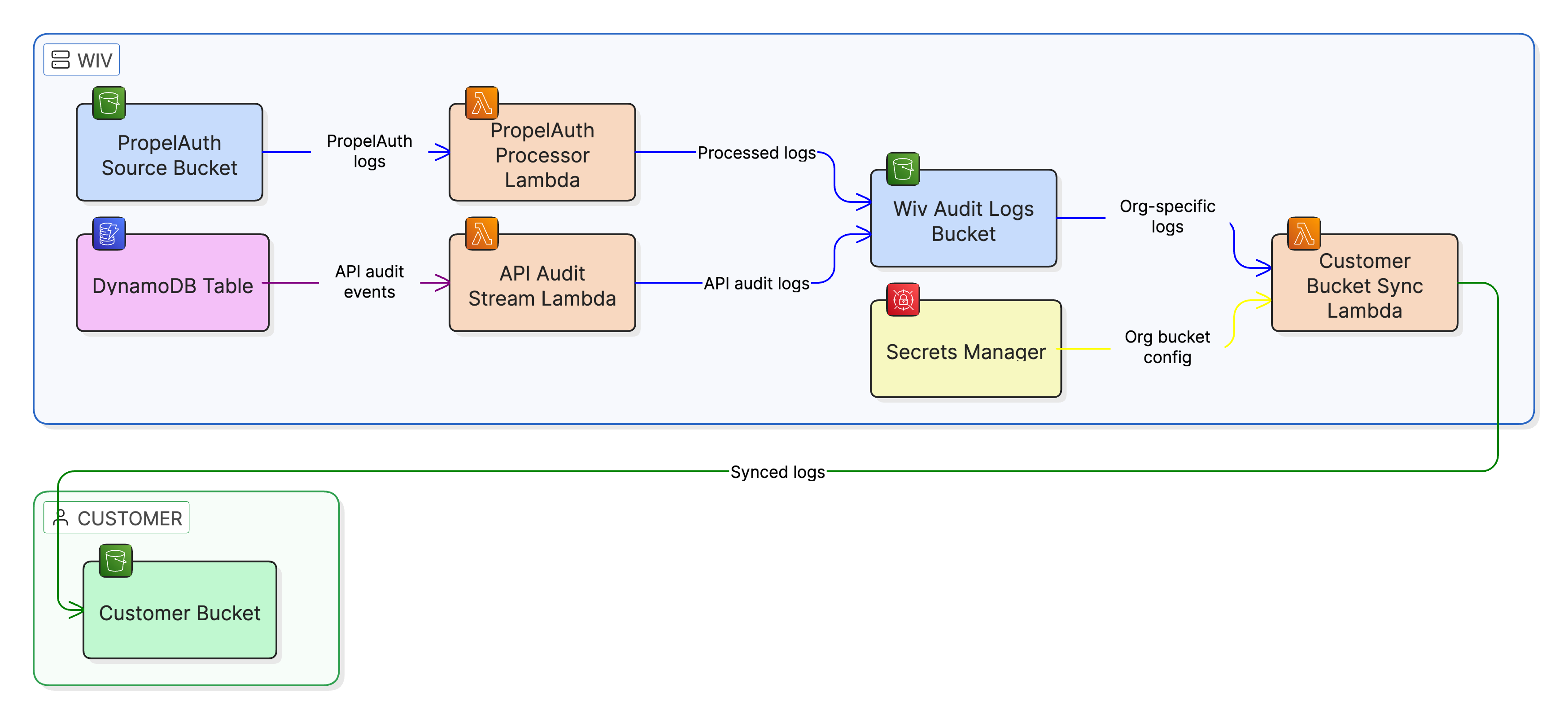
This document provides instructions for setting up the delivery of Wiv audit logs directly to your Amazon Web Services (AWS) account.
1. Overview of Audit Log Delivery
Wiv delivers audit logs to a dedicated Amazon S3 bucket within your AWS account.
Logs are:
Compressed using gzip.
Organized by your unique organization ID.
Categorized into three types:
Organization audit logs: org-audit-logs-{timestamp}.json.gz
User audit logs: user-audit-logs-{timestamp}.json.gz
API audit logs: api-audit-logs-{timestamp}.json.gz
2. Prerequisites
Before starting the setup, ensure you have:
An active AWS account.
The necessary AWS permissions to create IAM roles and S3 buckets.
Your Wiv organization ID (provided by Wiv support).
3. Setup ProcedureStep 3.1: Create the Target S3 Bucket
Create an S3 bucket to be the dedicated destination for your audit logs.
Example Command:
aws s3 mb s3://your-company-audit-logs --region us-east-1
Recommended Best Practices:
Data Protection: Enable versioning on the bucket.
Security: Enable server-side encryption (SSE-S3 or SSE-KMS).
Access Control: Restrict public access (maintain a private bucket).
Retention: Configure lifecycle policies for archiving or deleting older logs.
Step 3.2: Create the IAM Role for Wiv Access
Create an AWS IAM Role that Wiv will assume to write logs to your S3 bucket.3.2.1 Generate a Unique External ID
Crucial Security Step: Generate a unique External ID to secure the trust relationship between Wiv and your AWS account.
Command to Generate ID:
uuidgen

# Example output: 681d1539-fd63-4e6e-9426-fccdfdae1862
3.2.2 Define the Trust Policy
Create a file named trust-policy.json to define who can assume the role (Wiv's account) and under what condition (matching the External ID).
{

 "Version": "2012-10-17",

 "Statement": [

   {

     "Effect": "Allow",

     "Principal": {

       "AWS": "arn:aws:iam::613007325984:role/prod-aws-cdk-api-wf-opera-CustomerBucketSyncRole8E8-mUiiPZfuNHcc"

     },

     "Action": "sts:AssumeRole",

     "Condition": {

       "StringEquals": {

         "sts:ExternalId": "YOUR-EXTERNAL-ID-HERE"

       }

     }

   }

 ]

}
ACTION REQUIRED: Replace YOUR-EXTERNAL-ID-HERE with the UUID generated in step 3.2.1.3.2.3 Create the IAM Role
Execute the following command to create the role, referencing the trust policy.
aws iam create-role \

 --role-name wiv-audit-logs-sync \

 --assume-role-policy-document file://trust-policy.json
3.2.4 Define and Attach the Permissions Policy
The role requires minimal permissions: only the ability to write objects to the S3 bucket.
Create permissions-policy.json:

{

 "Version": "2012-10-17",

 "Statement": [

   {

     "Effect": "Allow",

     "Action": [

       "s3:PutObject",

       "s3:PutObjectAcl"

     ],

     "Resource": "arn:aws:s3:::your-company-audit-logs/*"

   }

 ]

}

ACTION REQUIRED: Replace your-company-audit-logs with your actual S3 bucket name.

Attach the Policy:

aws iam put-role-policy \

 --role-name wiv-audit-logs-sync \

 --policy-name audit-logs-write \

 --policy-document file://permissions-policy.json
Step 3.3: Submit Configuration to Wiv
Provide the following configuration details to Wiv support for log delivery to begin:
{

 "bucket_name": "your-company-audit-logs",

 "role_arn": "arn:aws:iam::YOUR-ACCOUNT-ID:role/wiv-audit-logs-sync",

 "external_id": "681d1539-fd63-4e6e-9426-fccdfdae1862"

}
ACTION REQUIRED:
Replace your-company-audit-logs with your S3 bucket name.
Replace YOUR-ACCOUNT-ID with your AWS account ID.
Replace the external_id value with the UUID generated in step 3.2.1.
Wiv will securely store this information and initiate the log delivery process.4. Log Structure and FormatLog File Location
Logs will be stored in your bucket under your organization ID:
s3://your-company-audit-logs/
└── {org_id}/
├── org-audit-logs-1769602181000.json.gz
└── ...
Log Format
Each .json.gz file contains a compressed JSON array of audit events, similar to the following:
[

 {

   "id": "57c850b7-46ba-4b53-a421-dd3f9dc6d2e0",

   "org_id": "3f7539ad-7f8b-4688-aee0-b9dbf2db728e",

   "org_name": "Your Organization",

   "event_type": "OrgCreated",

   "event_data": {...},

   "created_at": 1769611845,

   "caused_by_id": "...",

   "caused_by_type": "ApiKey",

   "caused_by_source_ip": "54.89.215.109",

   "relevant_user_email": null

 }

]
Viewing Logs (Example)
To download and decompress a log file:
# Download and decompress directly to console using jq

aws s3 cp s3://your-company-audit-logs/{org_id}/org-audit-logs-1769602181000.json.gz - | gunzip | jq .
5. Testing and TroubleshootingTesting Log Delivery
Wait a few minutes for Wiv to apply the configuration.
Check your S3 bucket for new files:
aws s3 ls s3://your-company-audit-logs/ --recursive
Download and inspect a log file to confirm correct content.
Troubleshooting Issues
6. Security Best Practices
External ID: Use a unique, random UUID for the trust relationship.
Least Privilege: Grant only s3:PutObject and s3:PutObjectAcl permissions.
Encryption: Enable bucket encryption (SSE-S3 or SSE-KMS).
Logging: Enable S3 access logging to audit access to your logs.
Monitoring: Use AWS CloudTrail to monitor when Wiv assumes the role.
7. CloudFormation Example
An AWS CloudFormation template is available to automate the creation of the S3 bucket and IAM role, ensuring best practices are applied.
## Example CloudFormation Template

```yaml
AWSTemplateFormatVersion: '2010-09-09'
Description: 'Wiv Audit Logs Setup'

Parameters:
  ExternalId:
    Type: String
    Description: 'Unique External ID for role assumption'
    NoEcho: true

Resources:
  AuditLogsBucket:
    Type: AWS::S3::Bucket
    Properties:
      BucketName: !Sub '${AWS::StackName}-audit-logs'
      VersioningConfiguration:
        Status: Enabled
      BucketEncryption:
        ServerSideEncryptionConfiguration:
          - ServerSideEncryptionByDefault:
              SSEAlgorithm: AES256
      PublicAccessBlockConfiguration:
        BlockPublicAcls: true
        BlockPublicPolicy: true
        IgnorePublicAcls: true
        RestrictPublicBuckets: true

  WivAuditLogsRole:
    Type: AWS::IAM::Role
    Properties:
      RoleName: wiv-audit-logs-sync
      AssumeRolePolicyDocument:
        Version: '2012-10-17'
        Statement:
          - Effect: Allow
            Principal:
              AWS: 'arn:aws:iam::613007325984:role/prod-aws-cdk-api-wf-opera-CustomerBucketSyncRole8E8-mUiiPZfuNHcc'
            Action: 'sts:AssumeRole'
            Condition:
              StringEquals:
                'sts:ExternalId': !Ref ExternalId
      Policies:
        - PolicyName: audit-logs-write
          PolicyDocument:
            Version: '2012-10-17'
            Statement:
              - Effect: Allow
                Action:
                  - 's3:PutObject'
                  - 's3:PutObjectAcl'
                Resource: !Sub '${AuditLogsBucket.Arn}/*'

Outputs:
  BucketName:
    Description: 'Audit logs bucket name'
    Value: !Ref AuditLogsBucket
  RoleArn:
    Description: 'Role ARN to provide to Wiv'
    Value: !GetAtt WivAuditLogsRole.Arn
  ExternalId:
    Description: 'External ID to provide to Wiv'
    Value: !Ref ExternalId
```
Template Usage:
# Deploy stack
aws cloudformation create-stack \  --stack-name wiv-audit-logs \  --template-body file://audit-logs-setup.yaml \  --parameters ParameterKey=ExternalId,ParameterValue=$EXTERNAL_ID \  --capabilities CAPABILITY_NAMED_IAM
# Get outputs
aws cloudformation describe-stacks \  --stack-name wiv-audit-logs \  --query 'Stacks[0].Outputs'
8. Support
For any questions or issues regarding your audit log delivery, please contact:
Email: support@wiv.ai
Please include: Your organization ID and the IAM Role ARN in all support requests.
Was this article helpful?
That’s Great!
Thank you for your feedback
Sorry! We couldn't be helpful
Thank you for your feedback
Feedback sent
We appreciate your effort and will try to fix the article