Overview
The GKE_Kubectl_Command step allows you to run kubectl commands directly against a Google Kubernetes Engine (GKE) cluster without needing to manually configure authentication or kubeconfig files.
Configuration Fields
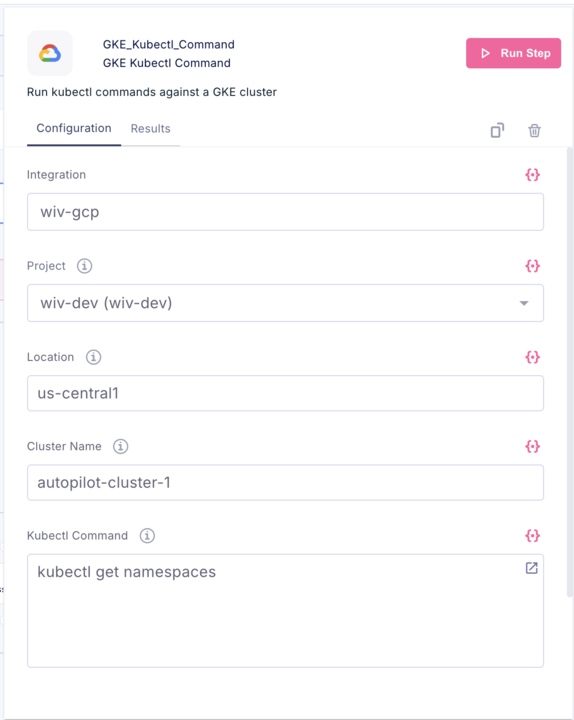
| Field | Description | Example |
|---|---|---|
| Integration | The GCP integration/connection to use for authentication | wiv-gcp |
| Project | The GCP project containing your GKE cluster | wiv-dev (wiv-dev) |
| Location | The region or zone where your cluster is deployed | us-central1 |
| Cluster Name | The name of your GKE cluster | autopilot-cluster-1 |
| Kubectl Command | The kubectl command to execute | get namespaces |
How to Use
- Select your GCP integration from the dropdown
- Choose the GCP project that contains your cluster
- Enter the cluster's location (region for Autopilot/regional clusters, zone for zonal clusters)
- Enter the cluster name
- Type your kubectl command in the command field
- Click Run Step
Output Format
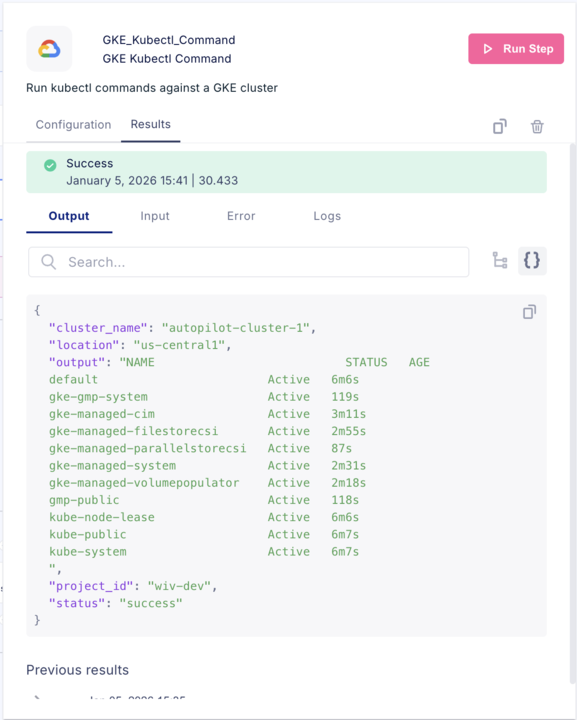
The step returns a JSON object containing:
{ "cluster_name": "autopilot-cluster-1", "location": "us-central1", "output": "<kubectl command output>", "project_id": "wiv-dev", "status": "success" }
Example Commands
| Command | Description |
|---|---|
get namespaces | List all namespaces |
get pods -A | List all pods across all namespaces |
get nodes | List cluster nodes |
get deployments -n default | List deployments in default namespace |
describe pod <pod-name> -n <namespace> | Get details about a specific pod |
logs <pod-name> -n <namespace> | View pod logs |
Notes
- The step handles GKE authentication automatically using the selected integration
- Execution time varies based on the command (shown in the results header)
- Previous results are preserved for reference
Was this article helpful?
That’s Great!
Thank you for your feedback
Sorry! We couldn't be helpful
Thank you for your feedback
Feedback sent
We appreciate your effort and will try to fix the article