Overview
Understanding parameters and data manipulation is essential for creating effective workflows. This section covers the fundamental concepts of how to access output values from previous workflow steps, reference advanced step outputs, navigate parameter syntax within different step scopes, target specific data fields, and utilize reserved keywords.
Think of parameters as the connectors that allow data to flow between workflow steps, letting you capture, transform, and use information throughout your automation. Just as variables help you manage data in programming, parameters help you control how information moves and transforms through your workflow.
While our intuitive UI menus make it easy to work with parameters without diving deep into the syntax, understanding what happens behind the scenes is valuable. This knowledge helps you better understand your workflows and gives you more control when building complex automations, even though you can accomplish most tasks through the simple interface.
This knowledge forms the foundation for building dynamic workflows that can adapt and respond to different data inputs and conditions.
Referencing Step Output
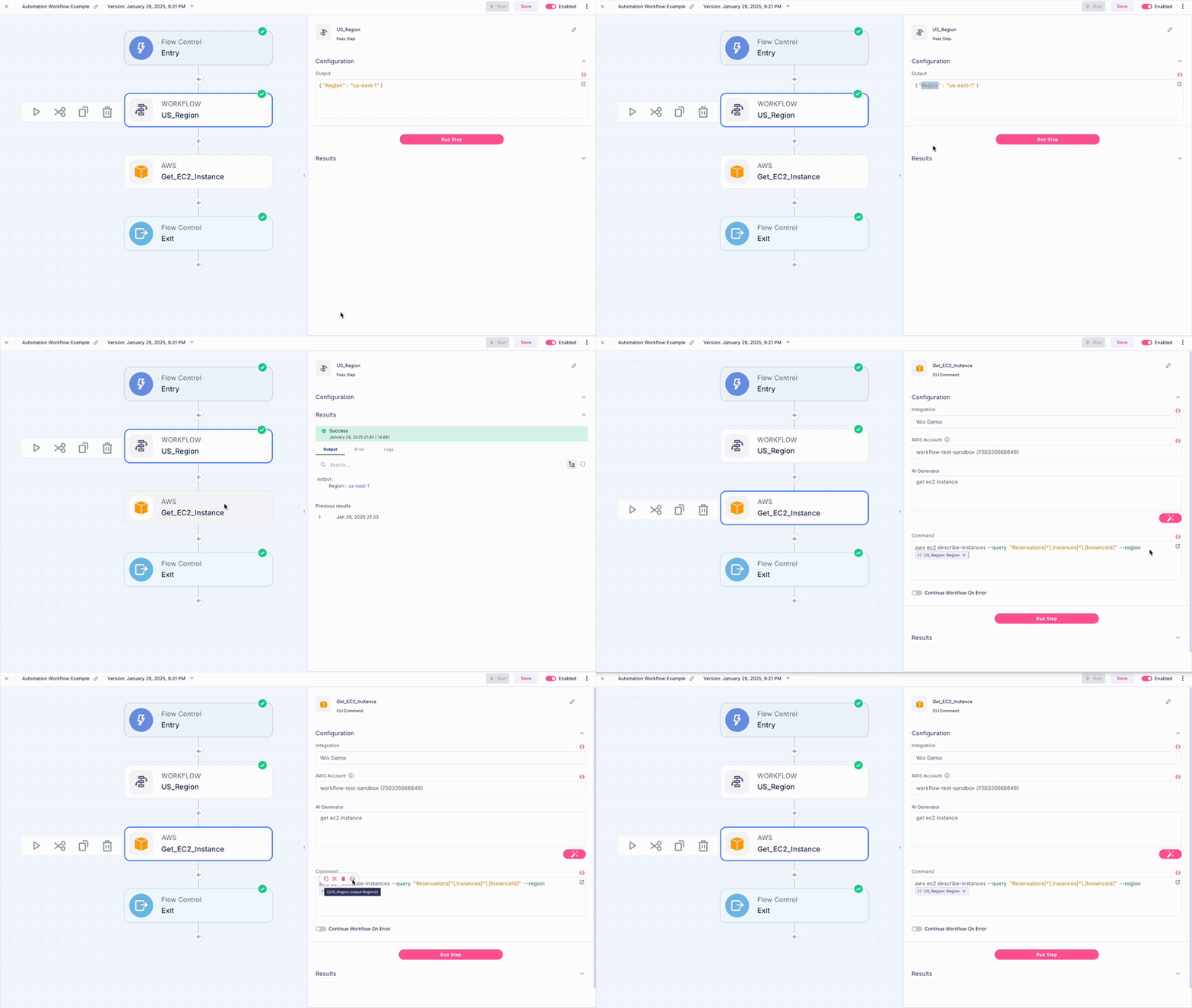
To mention the output of a previous step, you can use the following syntax:
{{STEP_NAME.OUTPUT}}This will refer to the complete output of the specified step.

Referencing Step Status
To check the step status you can access
{{Step_Name.status}}
Referencing a Specific Field
If you need to refer to a specific field within the step's output, you can do so by adding the field name:
{{STEP_NAME.OUTPUT.FieldName}}This will target the specific field named "FieldName" in the step's output.
Referencing an Item in an Array
Sometimes, you may need to target a specific item within an array. You can do this using the square brackets [] along with the index number:
{{STEP_NAME.OUTPUT.FieldArrayName[5]}}In this example, we're targeting the 6th item in the array "FieldArrayName."
Please note that an index in a list start from 0, so an Index of 5 refers to the 6th item in the list
Referencing an Item in a Loop
get iteration index:
{{LOOP.iteration}}Collector Functions
The collector supports the following functions:
Count. {{COLLECTOR.output.count}} returns the number of items in the collector (in a two dimensional list it will return the number of lists)
Distinct :
{{COLLECTOR.output.distinct(key_name)}} - assuming the collector collects json objects, returns a list of distinct values of the given key. If the collected objects are not json, will raise an exception
{{COLLECTOR.output.distinct()}} - returns a set of the collected items while removing any duplicated entries (if any)
Filter by : {{COLLECTOR.output.filter_by(key_name = value)}} returns a list of collected items that have a specific value for a given key.
If the collector contains a multi-dimensional list, you can apply a function on part of the output, for example: {{COLLECTOR123.output[1].count}}
Tree Helper
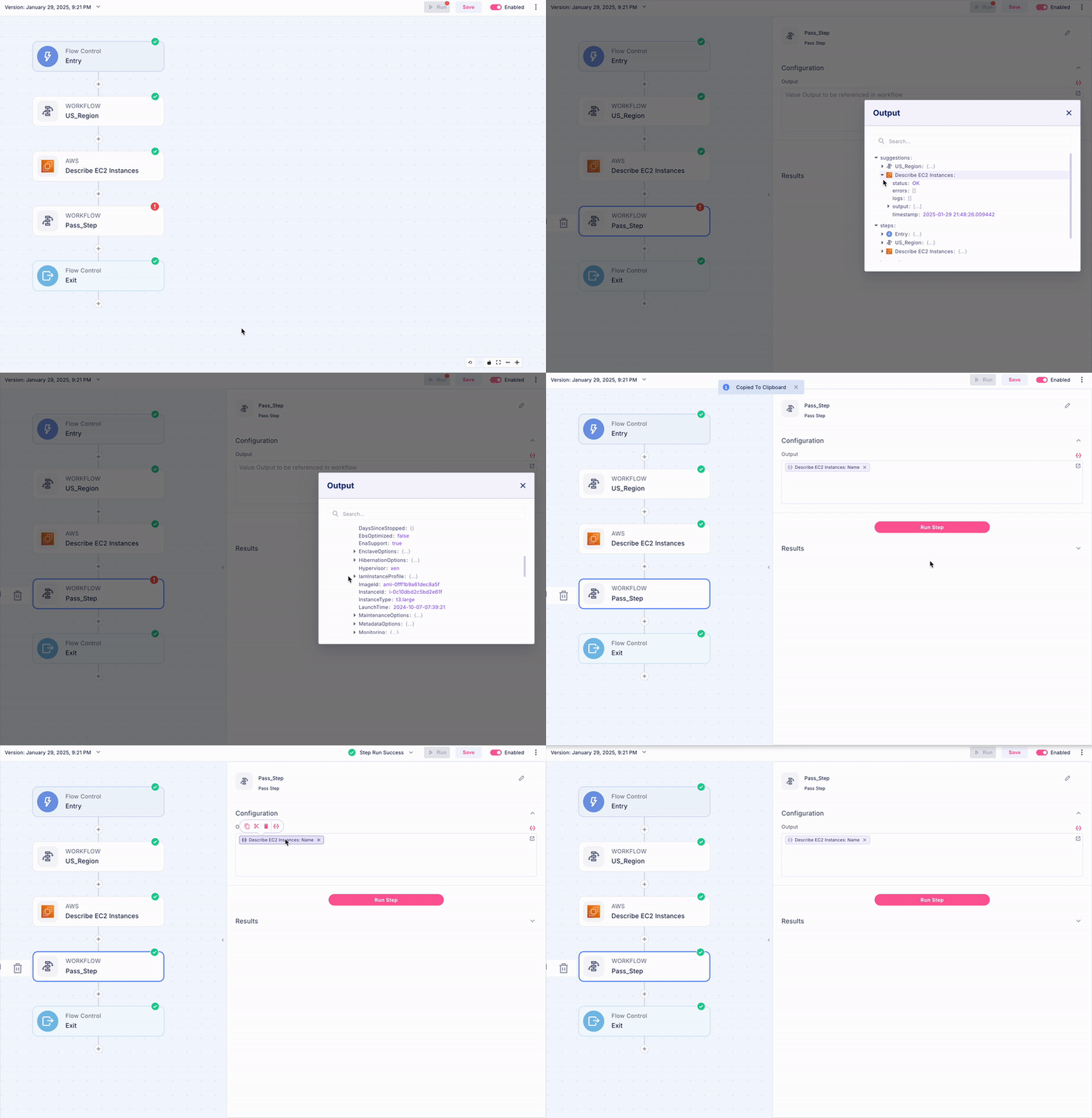
Navigating complex data structures in workflows can be challenging, which is why we created the Tree Helper tool. This specialized feature simplifies the process of accessing and referencing data from previous steps in your workflow.
Think of Tree Helper as your data navigation assistant - it lets you visually explore and select exactly the data point you need, automatically copying the correct path syntax with a single click. Instead of manually writing out complex parameter references, you can simply browse through your workflow's data structure and pick the exact value you want to use.
This tool is particularly valuable when working with nested data or arrays, as it eliminates the potential for syntax errors and helps you quickly find the precise information you need to reference in your workflow.
Conclusion
Wiv's syntax is designed with simplicity and efficiency in mind, allowing you to effortlessly navigate and manipulate your workflows. By understanding these basic principles, you'll be well-equipped to take full advantage of Wiv's powerful features.
Was this article helpful?
That’s Great!
Thank you for your feedback
Sorry! We couldn't be helpful
Thank you for your feedback
Feedback sent
We appreciate your effort and will try to fix the article