Challenge:
In Wiv.ai, users manage a variety of interconnected resources like workflows, datastores, dashboards, and case management. Without a centralized way to organize these, navigating and managing them becomes cumbersome and time-consuming.

Solution:
The introduction of “spaces” within the platform. Each space acts as a mini-app or project, grouping all relevant resources together. This centralization makes it easier to manage and navigate interconnected components.
How it Solves the Problem:
Global Space: Provides a central repository for common resources and logic accessible across all spaces, reducing duplication.
Regular Spaces: Each space is dedicated to a specific project or mini-app, making it easier to access relevant workflows, dashboards, and datastores.
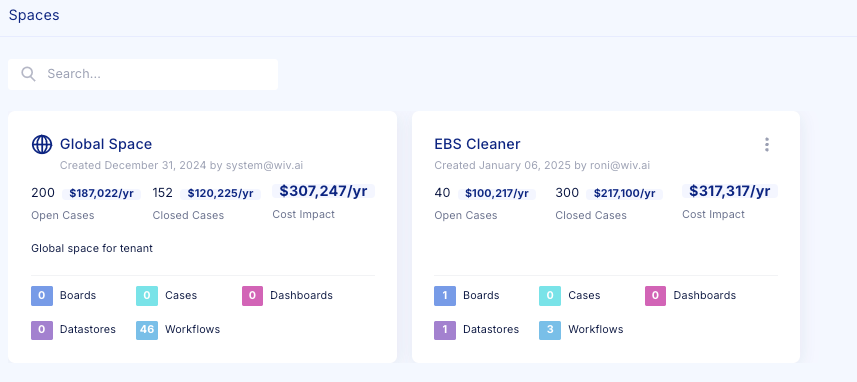
Each space contains
Automation sequences within a space. You can create new workflows from scratch or using Copilot AI, tailored to the specific project or mini-app the space represents.
Case management boards where users can track open and closed cases, understand their financial impacts, and dive into detailed information for each case.
Tables that hold project-specific data, allowing users to easily access and manage the information relevant to that space.
Dashboards:
Visual tools for tracking key metrics, monitoring progress, and gaining insights specific to the workflows and cases within that space.
Resources:
A section that allows for the movement and management of resources, enabling users to transfer resources from one space to another seamlessly.
Runs:
A history of all workflow executions within the space. Users can view detailed logs of each run, including execution status, timestamps, and outcomes, enabling them to monitor performance and troubleshoot issues efficiently.
A centralized view of all approval requests within the space. Users can track the status of approvals by workflow or by person, making it easy to manage pending actions, ensure governance, and facilitate collaboration across teams.
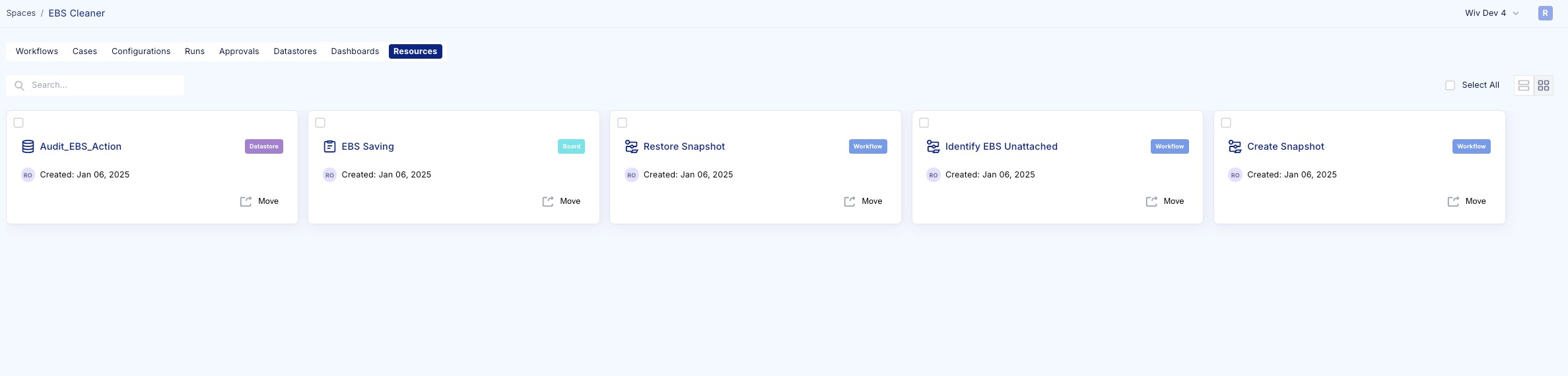
Each of these elements is designed to streamline and enhance the user experience within the Wiv.ai platform.
Was this article helpful?
That’s Great!
Thank you for your feedback
Sorry! We couldn't be helpful
Thank you for your feedback
Feedback sent
We appreciate your effort and will try to fix the article